
I started working with AWS and serverless back in 2016. A lot has changed in ten years, including how we use and manage resource tags.
Tags seem simple: a key, a value, done. But today, they support everything from cost allocation to access control and automation.
With so many tools and services applying tags, are there really dozens of tagging mechanisms? Not quite. Most ultimately rely on AWS APIs.
Let's break it down.
1. What are AWS resource tags?
AWS tags are metadata attached to AWS resources in the form of key-value pairs.
They allow us to describe resources using information that is not necessarily part of the resources technical configuration.
For example, an EC2 instance might have the following tags:
| key | Value |
|---|---|
| Name | payment-api |
| Environment | production |
| Team | platform |
| CostCenter | 1234 |
| ManagedBy | terraform |
These tags tell us something about the resource without affecting its primary technical purpose.
However, tags are not necessarily just descriptive metadata. AWS services and applications can use them to make decisions about permissions, automation, and resource management.
In other words, tags can become part of how we operate and control our AWS infrastructure.
2. What do we use AWS tags for?
There are numerous use cases for tagging. The most common ones include:
- Resource organization: Group resources by application, team, project, or environment.
- Cost allocation / FinOps: Attribute AWS spending to teams, applications, customers, or cost centers.
- Attribute-Based Access Control (ABAC): Control access to resources based on resource, principal, or request tags.
- Automation: Select resources for automated start/stop operations, maintenance, or cleanup.
- Operations: Identify ownership, filter monitoring targets, and support incident management.
- Backup and recovery: Select resources for backup policies and recovery workflows.
- Lifecycle management: Identify temporary resources, expiration dates, or retention requirements.
- Governance and compliance: Classify resources and validate organizational tagging standards.
- Resource discovery: Search for and group resources across AWS services.
3. Anatomy of an AWS tag
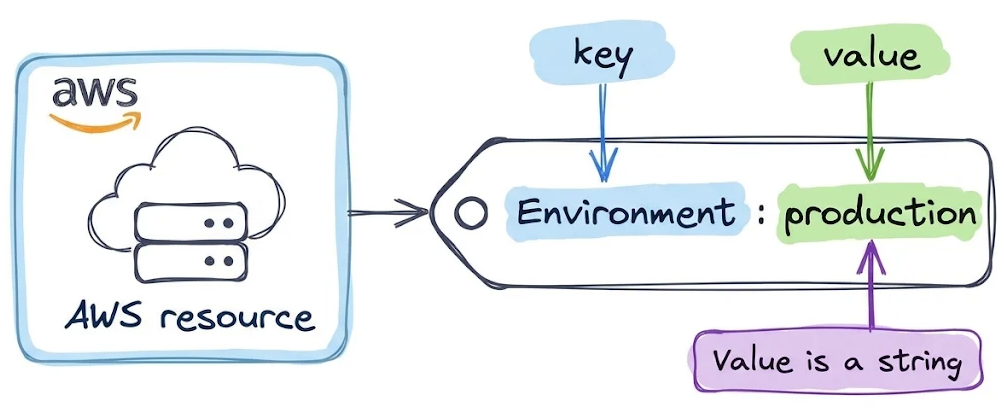
At its core, an AWS resource tag consists of two elements:
Key: The name of the attribute.
Value: The value assigned to that attribute.
For example:
Environment = production
Tag limitations
AWS has a few general rules governing how tags work.
| Property | Limit or behavior |
|---|---|
| Key type | String |
| Key length | 1–128 Unicode characters |
| Value type | String |
| Value length | 0–256 Unicode characters |
| Tags per resource | Generally 50 user-defined tags |
| Key uniqueness | Unique within each resource |
| Case sensitivity | Keys and values are case-sensitive |
| Reserved prefix | aws: is reserved for AWS |
| Complex values | No native support for lists or objects |
AWS-generated tags beginning with aws: do not count toward the 50-user-defined-tag limit. Some AWS services impose additional restrictions, so always check the tagging capabilities of the specific resource type.
Can a tag have multiple values?
Not natively. A tag has exactly one value associated with its key.
For example:
Team = platform
You cannot assign multiple independent values to the same key. But you could store something like:
Teams = platform,security
But AWS interprets this as a single string, not as a list. The same applies to numbers, booleans, or serialized objects. AWS tags do not provide native data types beyond strings.
Can the same tag key exist multiple times?
Not on the same resource. For example, a single resource cannot have both:
Environment = production
Environment = staging
Setting an existing key again generally updates or replaces its previous value.
However, tag keys are case-sensitive, so these are technically different:
Environment = production
environment = staging
That's legal for many AWS resource types, but probably not something youd want in a consistent tagging strategy.
4. How do tags get attached to AWS resources?
This is where things get interesting. If we simply list every tool capable of assigning tags, the list becomes quite long. But tools are not necessarily distinct tagging mechanisms.
For example, a Python script calling the AWS SDK and a CI/CD pipeline executing the AWS CLI are ultimately doing the same thing: invoking AWS APIs.
Similarly, AWS CDK and AWS SAM typically generate CloudFormation templates rather than tagging resources directly.
I find it more useful to distinguish three major paths through which resource tags get applied:
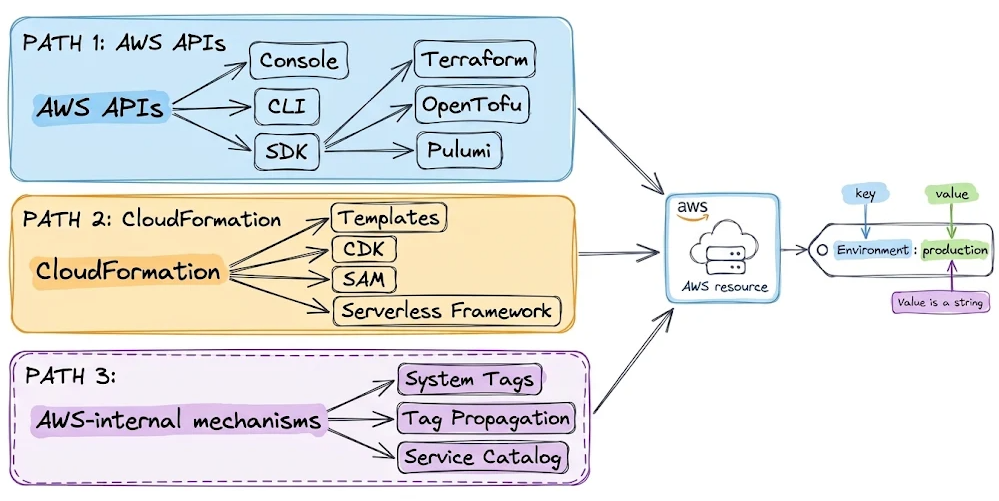
- Directly through AWS service APIs, including tools and IaC frameworks that use them.
- Through AWS CloudFormation, including tools that synthesize or deploy CloudFormation templates.
- Through AWS-internal tagging mechanisms, including AWS-generated tags and native tag propagation.
Path 1: Direct AWS API tagging
Most AWS services provide API operations for creating, modifying, and removing resource tags.
Depending on the service, you might encounter operations such as:
TagResourceUntagResourceCreateTagsDeleteTags
AWS also provides the Resource Groups Tagging API, which offers a common interface for tagging many supported resource types.
1.1 Tool: AWS Management Console
Probably the most familiar approach. For example, to tag an EC2 instance:
- Open the EC2 Console.
- Select an instance.
- Open the Tags tab.
- Choose Manage tags.
- Add
Environmentwith the valueproductionand save.
The Console ultimately sends the necessary requests to AWS APIs. It's a user interface, not a separate tagging mechanism.
AWS Resource Groups Tag Editor offers another console-based interface. It lets you search for supported resources and modify their tags in bulk.
1.2 Tool: AWS CLI
The AWS CLI exposes AWS service APIs through command-line operations. For example, to add a tag to an existing EC2 instance:
aws ec2 create-tags \
  --resources i-00123456789abcdef \
  --tags Key=Environment,Value=production
The underlying operation is the EC2 CreateTags API.
Alternatively, for resource types supported by the Resource Groups Tagging API:
aws resourcegroupstaggingapi tag-resources \
    --resource-arn-list arn:aws:s3:::MyBucket \
    --tags Environment=Dev,CostCenter=1234
Both examples use APIs to assign resource tags, but through different AWS API interfaces.
1.3 Tool: AWS SDKs
AWS SDKs provide programmatic access to the same APIs.
For example, using Python and Boto3:
import boto3

response = client.create_tags(
    DryRun=True|False,
    Resources=[
        'string',
    ],
    Tags=[
        {
            'Key': 'string',
            'Value': 'string'
        },
    ]
)
Whether this runs on your laptop, inside a Lambda function, or in a CI/CD pipeline doesn't change the underlying mechanism.
1.4 Tool: API-based Infrastructure as Code
Infrastructure as Code tools can also provision and tag resources through AWS APIs.
Terraform / OpenTofu
Example:
resource "aws_s3_bucket" "example" {
  bucket = "my-unique-example-bucket"

  tags = {
    Environment = "production"
    Team        = "platform"
  }
}
With the standard AWS provider, Terraform communicates with AWS service APIs to manage the resource and its tags. OpenTofu follows the same general approach.
Both tools support additional conveniences, such as provider-level default tags.
Pulumi
Using Pulumi's AWS Classic provider with TypeScript:
import * as aws from "@pulumi/aws";

const bucket = new aws.s3.Bucket("example", {
    tags: {
        Environment: "production",
        Team: "platform",
    },
});
The standard Pulumi AWS Classic provider manages resources through AWS APIs.
Pulumi AWS Native uses the AWS Cloud Control API, which is another API-based resource management interface.
Path 2: AWS CloudFormation
CloudFormation introduces another abstraction. Instead of directly managing individual resources through service APIs, we define the desired infrastructure as a stack. CloudFormation then coordinates resource creation, updates, and deletion.
It also manages tagging.
There are two relevant concepts here: resource-level tags defined in templates and tags assigned to CloudFormation stacks.
2.1 CloudFormation templates
A CloudFormation template can define tags directly on supported resources.
Example:
Resources:
  ExampleBucket:
    Type: AWS::S3::Bucket
    Properties:
      Tags:
        - Key: Environment
          Value: production
        - Key: Team
          Value: platform
Alternatively, tags can be supplied at the stack level:
aws cloudformation deploy \
  --template-file template.yaml \
  --stack-name tagging-example \
--tags CostCenter=12342.2 AWS CDK
AWS CDK allows us to define infrastructure in programming languages such as TypeScript or Python.
Example:
import { App, Stack, Tags } from "aws-cdk-lib";
import * as s3 from "aws-cdk-lib/aws-s3";

const app = new App();
const stack = new Stack(app, "TaggingExample");

new s3.Bucket(stack, "ExampleBucket");

Tags.of(stack).add("Environment", "production");

app.synth();
The Tags API uses CDK Aspects to apply tags to eligible constructs within a scope. CDK then synthesizes those tags into the CloudFormation representation.
2.3 AWS SAM
The AWS Serverless Application Model (SAM) extends CloudFormation with a simplified syntax for serverless applications.
Example:
Transform: AWS::Serverless-2016-10-31

Resources:
  ExampleFunction:
    Type: AWS::Serverless::Function
    Properties:
      Runtime: python3.13
      Handler: app.handler
      CodeUri: src/
      Tags:
        Environment: production
      PropagateTags: true
SAM transforms this resource definition into CloudFormation resources.
The PropagateTags property controls whether SAM passes the specified tags to supported resources generated for the function.
2.4 Serverless Framework
The Serverless Framework provides another way of defining serverless infrastructure.
For example:
service: tagging-example

provider:
  name: aws
  stackTags:
    stackTagKey: stackTagValue
  tags:
    tagKey: tagValue
In the standard AWS deployment workflow, Serverless Framework generates and deploys CloudFormation infrastructure.
The example uses provider.tags for supported application resources and provider.stackTags for the CloudFormation stack.
Path 3: AWS-internal tagging mechanisms
Not every tag originates from an API call or a template that directly specifies its key and value. AWS services can also generate or propagate tags automatically.
3.1 AWS-generated system tags
Some AWS services automatically attach tags to the resources they create or manage.
For example, CloudFormation can attach tags such as:
aws:cloudformation:stack-name = tagging-example
aws:cloudformation:stack-id   = arn:aws:cloudformation:...
We didn't explicitly define those tags ourselves. AWS generated them as part of its resource management functionality.
aws: prefix generally cannot be edited or deleted by customers.3.2 Native tag propagation
Some AWS services can propagate tags from one resource to another. A classic example is EC2 Auto Scaling.
We can configure the group like:
aws autoscaling create-or-update-tags \
  --tags \
  "ResourceId=orders-asg,ResourceType=auto-scaling-group,Key=Environment,Value=production,PropagateAtLaunch=true"
When the Auto Scaling group launches a new EC2 instance, the instance automatically receives:
Environment = production
The Auto Scaling service handles the tagging.
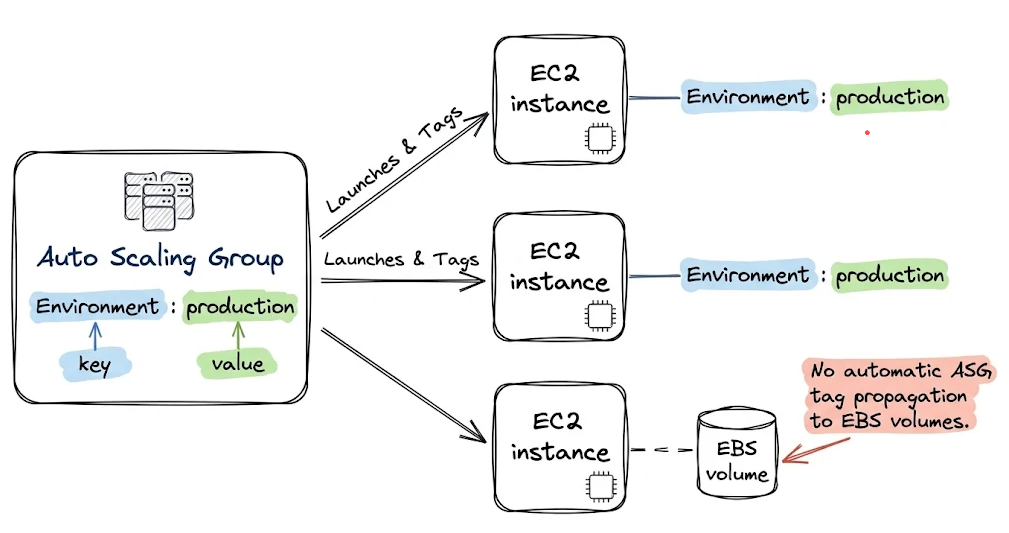
Other AWS services have their own propagation rules.
3.3 AWS Service Catalog
AAWS Service Catalog can also apply tags during resource provisioning.
Administrators can define reusable TagOptions that users select when provisioning supported products. Service Catalog can also add AWS-generated system tags, such as aws:servicecatalog:productArn, to identify the originating product.
Practical considerations
Understanding how tags are applied is only part of the problem. Keeping them consistent across an AWS environment requires additional care.
Define a tagging convention. Establish standard keys, capitalization, and allowed values. Avoid situations where one team uses Env, another environment, and a third Environment.
Prefer tagging at resource creation. Applying tags later can leave a period where resources are unclassified.
Treat tags used by ABAC as security-sensitive configuration. If users can freely change the tags that determine their permissions, the access-control model is ineffective.
Know which system owns the resource. Manually changing tags on an IaC-managed resource can create configuration drift. A later deployment may or may not restore the values defined in code.
Don't assume universal tag support. Not every AWS resource type supports tagging, the same APIs, or identical tag-propagation behavior.
Verify the result on the actual resource. Just because a tag exists in a CloudFormation stack, CDK construct, or parent resource doesn't guarantee it appears on every resource created underneath it.
Many tools, many tagging paths
AWS gives us numerous ways to work with resource tags. But once we stop listing individual tools, the picture becomes simpler.
| Path | Examples |
|---|---|
| AWS APIs | Console, CLI, SDKs, Terraform, OpenTofu, Pulumi AWS Classic |
| AWS CloudFormation | CloudFormation templates, AWS CDK, AWS SAM, Serverless Framework |
| AWS-internal mechanisms | AWS-generated system tags, native tag propagation, Service Catalog |
These categories are useful even though they aren't completely isolated. CloudFormation also uses AWS APIs internally, and AWS services may generate additional tags during CloudFormation-driven provisioning.
The distinction is about where tagging behavior is defined and controlled.
Knowing the origin makes it much easier to reason about inconsistent tagging, configuration drift, and resource ownership.
The challenge with AWS tagging isn't creating key-value pairs. It's making sure the right tags consistently reach the right resources, regardless of how those resources are created.